


Best QuickBooks alternatives in 2026

QuickBooks is the default accounting software for small business, and for a lot of people it's more than they need at a price that keeps climbing. The usual reasons for looking elsewhere are the same three: the monthly cost creeps up every year, the interface is dense and slow to learn, and useful features sit behind higher tiers that cost more again.
The good news is the market is full of real alternatives, several of them free or close to it. The catch is that "best" depends entirely on what you actually use QuickBooks for. Someone running payroll for ten staff needs a very different replacement than a sole proprietor who just sends invoices and tracks a few expenses.
This article covers why people leave, what to check before you do, the alternatives worth a look with honest trade-offs, and how to pick and switch without losing your history.
Why people leave QuickBooks
It helps to be clear about which problem you're actually trying to solve, because each one points at a different replacement.
- Price. The most common reason. Entry plans start around $30 CAD a month, but the features most businesses want sit in Plus, closer to $110 CAD a month, and the published price keeps climbing: the popular Plus plan rose by around two-thirds in the five years to 2025 (pricing updates), and the full plan-by-plan breakdown is in the guide on QuickBooks price increases. If cost is the driver, free and low-cost options below will feel like a different world.
- Complexity. QuickBooks is built to do almost everything, which makes it slow and busy if you only need a fraction of it. If you spend more time hunting through menus than doing the task, a simpler tool will save you hours.
- Feature gatekeeping. Things you'd consider basic, like more detailed reports or certain integrations, are often held back for higher tiers. If you're paying for Plus to unlock one feature you use, a different tool may include it lower down.
- You've outgrown it the other way. Less common, but some businesses leave because they need something more specialized, like heavy inventory or a specific industry workflow QuickBooks doesn't handle well.
Write down which of these is yours. "QuickBooks is expensive" and "QuickBooks is too complicated" lead to different shortlists, and chasing both at once is how people end up unhappy with whatever they switch to.
Before you switch, check what you actually use
The fastest way to pick the wrong replacement is to assume you need every QuickBooks feature. Most people use a handful. Open your account and note which of these you genuinely touch in a normal month:
- Invoicing. Almost everyone. Every alternative below does this well.
- Expense and income tracking. Most people. Widely available, including in free tools.
- Bank feeds. Automatic import of bank transactions. Common in paid tools, rarer and more limited on free tiers.
- Payroll. The big one. If you run payroll through QuickBooks, this narrows your options sharply, because payroll is region-specific and not every alternative offers it. Be honest about whether you need it built in or can run it separately.
- Sales tax handling and reports. If your tax setup is complex, check each alternative handles your region properly before switching.
- Accountant access. If your accountant works inside your QuickBooks file, ask them first. Some accountants will happily work with another tool; some strongly prefer the one they know.
That last point is worth its own line: talk to your accountant before you switch. The cost of a tool that your accountant refuses to touch is a frustrated accountant and a slower, pricier tax season. Often they'll be fine with the change. Sometimes the few dollars QuickBooks costs over an alternative is cheaper than the friction of switching away from what they use.
The honest answer: you might not need to leave
This article is on a competitor's site, so take this with that in mind, but it's true: some people shopping for a QuickBooks alternative should stay on QuickBooks. If your accountant uses it, your payroll runs through it, and your only complaint is the price, the switching cost in time and risk can be larger than a year of the price difference.
The people who should switch are the ones where the fit is genuinely wrong: paying for Plus to use a fraction of it, fighting the complexity every week, or never having needed the deep features in the first place. If that's you, the alternatives below are real, and several are free. If it isn't, downgrading your QuickBooks plan or trimming what you pay for may solve the problem without a migration at all.
The alternatives worth a look
Order roughly follows how broad the appeal is, not preference. Match these to the feature list you wrote earlier rather than picking the most popular name.
At a glance, here is how the main alternatives stack up. The detail on each follows below.
| Tool | Free tier | Best for | Built-in payroll | Paid from |
|---|---|---|---|---|
| Wave | Yes, no time limit | Sole proprietors who want free | Paid add-on | ~$25/mo (Pro) |
| FreshBooks | No, trial only | Freelancers who bill by time | No | ~$26/mo |
| Xero | No, trial only | Closest to QuickBooks | Add-on | ~$25/mo |
| Zoho Books | Yes, smallest businesses | Zoho users, automation | No | Low-cost tiers |
| ZipBooks | Yes, starter tier | Simple, light needs | No | ~$20/mo |
| Argo Books | Yes, no time limit | Free, with data on your machine | Canada only, on Premium | ~$15/mo |
- Wave. The obvious free pick. Core invoicing and accounting are genuinely free, with no time limit. You pay for card payments, payroll, and the Pro tier (around $25 CAD a month). Best for sole proprietors and small service businesses that want to stop paying for software entirely. The trade-offs: thinner support, less active development than it once had, and some features have moved from free to Pro over time.
- FreshBooks. The friendliest to learn, built for freelancers and service businesses. Strong time tracking, project profitability, and a clean client portal. Plans start around $26 CAD a month for Lite, with Plus nearer $42 CAD. The trade-off: lower tiers cap your number of billable clients, and a long client list pushes you up the tiers.
- Xero. The closest in spirit to QuickBooks, and the usual pick outside North America. Strong bank feeds, multi-currency, and a big accountant network in the UK, Australia, and New Zealand. Starter is around $25 CAD a month. The trade-off: lower-tier plans cap monthly invoices, which can surprise you in a busy month.
- Zoho Books. Full accounting with strong automation, especially if you already use other Zoho products. Reasonable pricing and a real free tier for the smallest businesses. The trade-off: it works best when you're inside the wider Zoho world, and the suite has a learning curve of its own.
- ZipBooks. Simpler and lighter than QuickBooks, with a free starter tier and a clean interface, paid plans from around $20 CAD a month. Good for a small service business that wants basics without bulk. The trade-off: fewer advanced features and a smaller ecosystem than the bigger names.
- Odoo. Not just accounting, a whole modular business suite. The accounting app is free on its own as a single app, with paid plans once you add modules. Powerful if you want inventory, CRM, and more in one system. The trade-off: it's far more than most small businesses need, and the power comes with setup work.
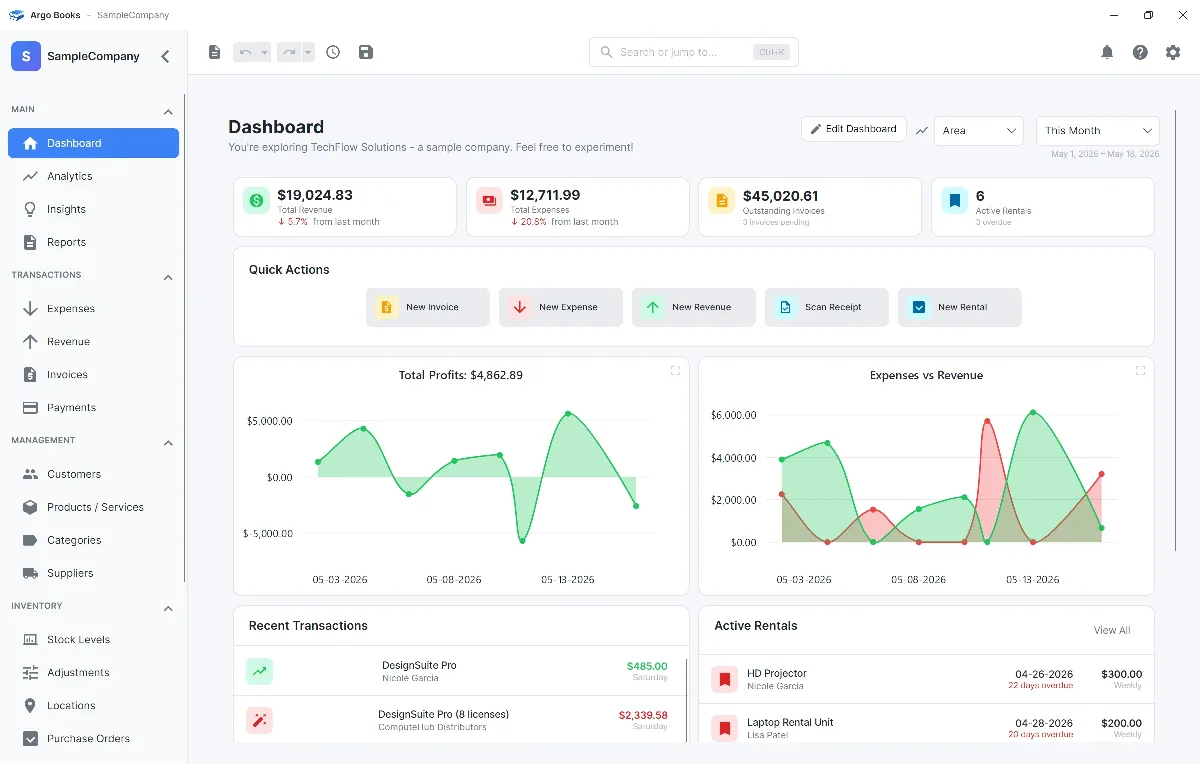
- Argo Books. Newer, freemium, with a generous free tier (25 invoices a month, basic bookkeeping, free receipt scans, no time limit) and Premium at $15 CAD a month or $150 a year for higher volumes, more receipt scanning, and advanced features. Built as a desktop app (Windows, macOS, and Linux) so your data lives on your machine. The trade-offs: a smaller accountant ecosystem and fewer integrations than the older players, and built-in payroll that covers Canada only, so staff outside Canada still need a separate payroll service.
For most people the real shortlist is two or three of these. If you want free and simple, look at Wave and Argo Books. If you're a service business that values ease of use, FreshBooks. If you want the nearest thing to QuickBooks itself, Xero. Pick one, try it for a month on a free trial or free tier, and switch if it's wrong.
Matching the alternative to your situation
A quick way to narrow it down by what you are:
- Sole proprietor, cost-driven. Wave or Argo Books. Both have real free tiers you can run a small business on without paying.
- Freelancer or consultant who bills time. FreshBooks for the time tracking and client portal, or Argo Books if you want a free tier.
- Outside North America. Xero is usually the smoother pick, with the largest local accountant network in the UK, Australia, and New Zealand.
- You run payroll in-house. Stay with a tool that has built-in payroll for your region: QuickBooks, Xero, a dedicated payroll add-on, or Argo Books if your staff are in Canada. This is the single feature most likely to keep you put.
- You need inventory, CRM, and operations in one system. Odoo, accepting the setup cost.
- You want simple, with your data on your own machine. Argo Books, accepting the smaller ecosystem.
If two of these describe you and point at different tools, the payroll line wins. Payroll is the hardest thing to bolt on afterward, so let it anchor the decision.
How to switch without losing your history
The migration is usually smaller than the dread of it, but a few moves keep it clean:
- Switch at the start of a fiscal year if you can. Close out the old year in QuickBooks, run every report you'll want for tax time, and start the new year in the new tool. Mid-year switches leave your annual reports split across two systems and hand your accountant a stitching job.
- Export your data from QuickBooks first. Customer lists, invoice history, and a chart of accounts all export to CSV. Most alternatives import these. Bank-feed history and deep customization are the parts that don't travel cleanly.
- Keep QuickBooks read-only for a while. Don't cancel the day you switch. Keep access for a month or two so you can look up anything the import didn't carry. Once you're sure nothing's missing, cancel.
- Tell your accountant the date. Give them the switch date and the new tool's name up front, so the hand-off at tax time isn't a surprise. A two-minute heads-up saves hours later.
Done at a year boundary with the old account kept live for a month, the switch is a weekend of work, not a crisis. The thing that actually goes wrong is switching mid-year with no export and cancelling the old account too soon. Avoid those three and the move is routine.
Frequently asked questions
Yes, partly, and you should read it that way. It's on the Argo Books site, and Argo Books is one of the alternatives listed. We tried to keep it honest: Argo Books appears last in the list, not first, every competitor is described with real strengths, and the article says plainly that some people shopping for an alternative should stay on QuickBooks. If the right answer for you is Wave, Xero, or even staying put, that is the answer, and we would rather tell you that than sell you a switch you don't need.
Often yes, but ask before you switch, not after. Many accountants happily work with Xero, Wave, FreshBooks, and others, and several prefer Xero. Some are deeply set up around QuickBooks and would rather you stayed. The practical move is a one-line email to your accountant naming the tool you are considering and asking if it works for them. Their answer can save you a migration, or save you from a tax season where your accountant is fighting an unfamiliar tool by the hour.
The core data, yes. Customer lists, invoice history, and the chart of accounts export from QuickBooks as CSV files, and most alternatives can import them. What does not carry cleanly is bank-feed transaction history, which past transactions were matched to the bank, and any custom reports or automation you built inside QuickBooks. The clean approach is to export and import the lists, keep QuickBooks accessible for a month or two for lookups, and start fresh transactions in the new tool from a clear date, ideally the start of a fiscal year.
For many small businesses, yes. Wave and Argo Books both have free tiers that handle invoicing and basic bookkeeping with no time limit, and plenty of sole proprietors and small service businesses run on them for years. Free stops being enough when you need built-in payroll, heavy inventory, complex multi-entity reporting, or a large team in the books at once. If you need those, you are comparing paid tools, not free ones. If you don't, a free tier can genuinely replace a paid QuickBooks plan and the saving is real.
Xero is generally the nearest in scope and feel: full double-entry accounting, strong bank feeds, a large accountant network, and a comparable feature set, with an interface many people find cleaner. It's the usual pick for someone who wants QuickBooks-level capability without QuickBooks. The catch is that Xero is paid, with invoice caps on lower tiers, so it solves the complexity complaint more than the cost one. If price is your main reason for leaving, a free tool like Wave or Argo Books is a bigger change than Xero, but a bigger saving too.